
EZ Manga: Webtoon & Manhwa
EZ Apps StudioComics
3.76.00 Reviews
- Version
- 1.0.75
- Installs
- 10.00K
- Age Rating
- Mature 17+
Screenshots
Our Review of EZ Manga: Webtoon & Manhwa
 Analysis by Appyee
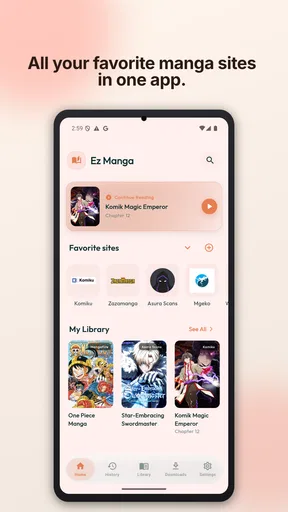
I approached EZ Manga: Webtoon & Manhwa as a practical reading companion rather than as a full comic store. That distinction matters. Its appeal is the way it brings manga and webtoon browsing, a reader-focused view, and synchronization into one place, while keeping the basic download price at free. In my experience, the app makes the most sense for readers who already move between several series and want a cleaner way to keep track of what they are reading.
It is a Comics app from EZ Apps Studio, aimed at mature readers with a 17+ content rating. The current release is version 1.0.50, and it runs on Android 7.0 or later. The app has passed around ten thousand installs, with a 3.4 average from roughly sixty-five ratings. Those figures suggest a young product with a real user base, but not one that has yet reached the polish or broad confidence of the biggest established comic platforms.
How the current reading experience feels
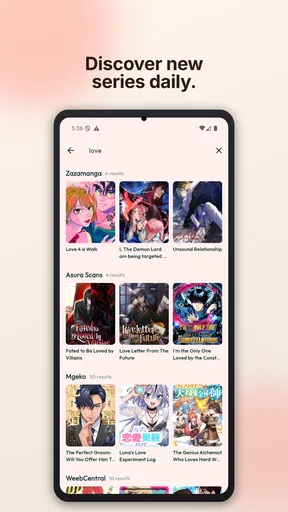
The first thing I noticed is that the app is built around discovery and access rather than a single publisher’s catalog. That gives it a different rhythm from an official manga service. Instead of opening into one tightly controlled library, I use it more like a browsing layer: find something interesting, open it in reader mode, and return later through the app’s organization and sync tools.
That approach is useful when my reading habits are scattered. I might discover a webtoon during a short break, switch to a manhwa later in the evening, and then want to continue from another device. A conventional browser can handle the first two steps, but it is less comfortable for maintaining a personal reading routine. The value here is in reducing the small bits of friction between finding a title and getting back to the right place.
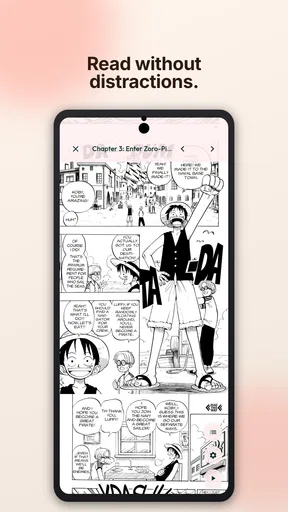
The reader mode is particularly important. Comic pages are often awkward in ordinary mobile browsers, especially when menus, banners, or surrounding page elements compete with the artwork. A dedicated reading view gives the content more room and makes the phone feel less like a web page and more like a comic reader. I would not describe this as a reason to abandon every other reading app, but it is the feature that gives this one a clear purpose.
The best use of EZ Manga is as a personal reading hub, not as a replacement for every official comic service. That expectation keeps the experience realistic. It is convenient for browsing and continuing a reading session, while official alternatives remain stronger when you care about publisher relationships, licensed availability, formal translation quality, or a clearly defined catalog.
Browsing works best when I already know what I want
I found the browsing side more useful when I had a specific mood or series in mind. Looking for a particular kind of webtoon, checking whether a familiar manhwa is available, or moving between a few ongoing reads feels more purposeful than endlessly scrolling without a plan. The app’s broad identity makes it attractive to readers who do not want to limit themselves to one format.
That flexibility also creates a trade-off. A broad browser can feel less curated than an official platform with editorial shelves, publisher collections, and carefully managed recommendations. If your favorite part of reading is discovering professionally selected titles, a dedicated publisher app may feel more satisfying. EZ Manga is better suited to people who enjoy controlling the search themselves.
On a small phone, reader mode can also change how I decide to read. I am more willing to catch up in short sessions because I do not have to repeatedly fight with a cramped page layout. For long chapters, I still prefer a larger screen when possible. The app helps with presentation, but the physical limits of a phone remain, particularly with detailed panels or pages that need careful visual inspection.
Synchronization matters more than it first appears
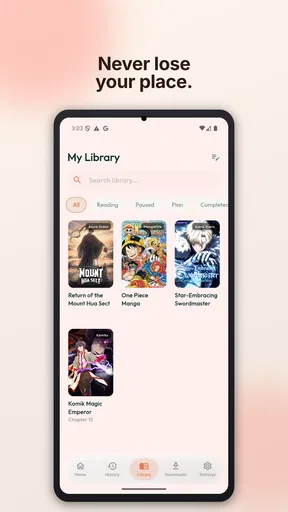
Sync sounds like a minor convenience until a reading list becomes large. Once I have several series in progress, remembering the last chapter or page manually becomes irritating. A synchronized reading state can save that effort and make switching devices feel natural. For someone who reads mostly on one phone, this benefit is less dramatic, but it still helps after reinstalling or changing how and where they read.
My practical advice is to treat synchronization as a habit rather than an emergency backup. After finishing a chapter, I would give the app a moment to register the change before closing it or moving elsewhere. That workflow is especially sensible for readers who alternate between devices. It is a small step, but it reduces the chance of opening a series later and wondering whether the app saved the correct position.
Sync is also most valuable when the reader’s library is active rather than enormous and abandoned. If I save everything that looks interesting, the convenience can be diluted by clutter. I get better results by keeping current reads easy to identify and treating the app as a working shelf instead of a permanent archive of every title I may someday try.
What the current version tells me about the product
Version 1.0.50 places the app in an early stage of its life. That does not automatically make it unreliable, but it does shape my expectations. I see it as a product still establishing its reading workflow, navigation choices, and long-term identity. The current release is usable enough to evaluate on its own merits, yet I would not assume that every rough edge has been solved simply because the version number has advanced.
The release date of March 27, 2026, also makes the timing relevant. Existing users are not looking at a mature service with years of accumulated refinement; they are using a relatively new app whose direction may become clearer through future updates. For a new reader, that can be attractive because the experience may feel focused and uncluttered. For someone who depends on a large, stable archive, the youth of the product is a reason to keep a second reading method available.
In other words, the version number is evidence of the current build, not a promise about what comes next. I would judge future releases by practical changes: smoother reader navigation, clearer organization, dependable synchronization, and better handling of long reading sessions. Those are the areas that will decide whether the app grows from a useful browser into a daily destination.
How existing readers may feel the change
For someone already using the app, the biggest advantage of staying with it is continuity. A reading workflow becomes valuable when it remembers the user’s habits and does not force a fresh start every time the app changes. The combination of browsing, reader mode, and sync gives existing users a reason to keep their active series together instead of returning to scattered browser tabs.
At the same time, early adopters should expect some adjustment as the product evolves. New releases can change how navigation feels, where a reading list sits, or how quickly a user reaches the reader. That is not necessarily negative, but it means a familiar routine may need occasional re-learning. I would be more tolerant of that in a free app, especially when the update improves the path from discovery to reading, but I would still want the basic reading flow to remain predictable.
Readers who have already built a large collection elsewhere may not gain much from moving everything immediately. The app is more compelling when starting a fresh set of active reads or when the existing system is already inconvenient. Migrating purely for novelty can create more work than it saves. I would test a few regular titles first, see whether the reader mode fits my eyes, and only then make it part of my main routine.
Where the app still asks for patience
The 3.4 average rating is a useful warning to balance the positive experience. It does not tell me that the app is poor, but it does suggest that the experience is not universally smooth. With a relatively modest review history, I would avoid treating the product as fully proven. A reader who needs perfect reliability, extensive support, or a highly polished ecosystem may prefer a more established alternative.
The free entry point is appealing, but in-app purchases ranging from $2.99 to $69.99 per item mean that the complete cost can depend on what the user chooses to buy. I would pay attention to purchase prompts and decide in advance whether I only want the free experience or am comfortable spending for extras. The broad price range makes it especially important not to assume that downloading the app defines the total cost of using it.
Another limitation is the difference between a convenient browser and an official source. Readers who care about authorized releases, stable publisher catalogs, professional localization, or direct support for creators should compare this app with official manga and webtoon services before settling in. EZ Manga may be the more convenient tool for bringing different reading interests together, but convenience does not automatically make it the best choice for every title or every reader.
The mature rating should also influence who uses it. This is not an app I would hand to a younger reader simply because the subject is comics. Adults should still use their own judgment about the material they open, particularly when browsing across different kinds of manga and webtoon content. The rating is part of the product’s identity, not a detail to ignore.
Three workflows that make it more useful
My first recommended workflow is the “active shelf” method. I would keep only series I am currently reading or genuinely intend to start soon. That makes synchronization more meaningful because the list reflects real priorities rather than every passing discovery. When a series is finished or no longer interests me, removing it keeps the next reading decision quick.
The second is to separate discovery from serious reading. I would browse when I have time, save a small number of possibilities, and reserve longer sessions for the reader mode. This avoids turning the app into an endless stream of thumbnails and helps me notice whether a title actually works on a phone screen before committing to it.
The third is to use device switching deliberately. If I begin on a phone and plan to continue elsewhere, I would stop at a natural chapter break, confirm that the reading position has synchronized, and then open the same series on the second device. That is more reliable than jumping between devices in the middle of a long chapter and assuming every position will be captured perfectly.
These workflows are not flashy features, but they reveal where the app has practical value. It is strongest when I use it to reduce repeated searching and keep a small, active reading routine organized. It is weaker when I expect it to replace a carefully licensed library, a social discovery network, and a premium reading ecosystem all at once.
Who should try it, and who should skip it
I would recommend giving it a try if you read both manga and webtoons, prefer a browser-like approach to finding series, and want a reader view that is more comfortable than ordinary mobile pages. It is also a reasonable experiment for someone who changes devices or dislikes losing track of current chapters. The free download makes testing the workflow relatively straightforward, provided the mature rating suits you.
I would be more cautious if you only read one publisher’s catalog, need a guaranteed official source, or expect a deeply polished recommendation system. In those cases, the usual official alternatives may be better because their catalogs, licensing, translations, and account systems are built around a narrower but more controlled experience.
I would also skip it as a primary solution if paid extras are likely to frustrate you. The app can be useful without turning every session into a purchase decision, but anyone uncomfortable with optional spending should establish that boundary before building a large routine around it. A free starting point is not the same thing as a completely cost-free ecosystem.
What I will watch in future releases
For the next stage of the product, I would watch how consistently the core loop holds together: discover a title, open it comfortably, save progress, and return without confusion. That loop matters more than adding a long list of decorative features. If future updates make those four steps faster and more dependable, the app will become easier to recommend beyond curious early users.
I would also look for clearer separation between browsing and reading, sensible control over a growing library, and synchronization that remains trustworthy when readers switch devices. Those improvements would directly address the needs of people who use the app every day rather than occasionally opening it to search for a single series.
My current verdict is cautiously positive. EZ Manga: Webtoon & Manhwa has a clear practical idea, and its combination of manga browsing, webtoon access, reader mode, and sync can make mobile reading less scattered. It is not the obvious choice for readers who prioritize official catalogs or mature platform polish, and the mixed average rating plus optional purchases deserve attention. Still, for an adult reader who wants a flexible, free starting point and is willing to judge the app through actual use, it is worth trying. I would keep expectations grounded, begin with a small active shelf, and let the reliability of the current version decide whether it earns a permanent place in my reading routine.
Privacy and Permissions
See what permissions an app requests and how it handles your data.
- Other
- view network connections, full network access, prevent device from sleeping, Google Play license check, read Google service configuration
Verdict
Strengths of EZ Manga: Webtoon & Manhwa
- Clean reading interface with comfortable page and panel navigation.
- Supports both webtoons and manhwa in one dedicated library.
- Regular content updates can keep the catalog feeling fresh.
- Search and browsing tools make it easier to discover new series.
- Reading progress helps you return to unfinished chapters quickly.
Limitations of EZ Manga: Webtoon & Manhwa
- Some titles or chapters may be unavailable depending on your region.
- Ad interruptions can make free reading less convenient.
- Translation quality may vary between different series.
- The app may require a stable connection for smooth chapter loading.
- New releases can occasionally take time to appear in the catalog.
Similar Picks in This Category
View All
WEBTOON: Manga, Comics, Manhwa
NAVER WEBTOON4.6

MangaToon: Comic & Manga
MangaToon4.3

네이버 웹툰 - Naver Webtoon
NAVER WEBTOON4.3

Tapas – Comics and Novels
Tapas Entertainment Inc.4.2

Lezhin Comics - Daily Releases
LEZHIN ENTERTAINMENT3.3

WebComics - Webtoon & Manga
WEBCOMICS HOLDINGS HK LIMITED4.4
Frequently Asked Questions
What is EZ Manga: Webtoon & Manhwa?
EZ Manga: Webtoon & Manhwa is a mobile reading app designed for fans of digital comics, including manga, manhwa, and webtoon-style series. It typically brings titles into categories and reading lists so users can discover new stories more easily. Before downloading, check the current catalog, supported languages, publisher information, and whether the titles you want are officially available in your region.
Is EZ Manga: Webtoon & Manhwa free to use?
The app may be available to download at no initial cost, but free installation does not necessarily mean that every story or chapter is completely free. Some content can include advertisements, in-app purchases, premium chapters, subscriptions, or other access limits. Review the app-store listing and payment details carefully, especially if children or other users share your device.
Does EZ Manga: Webtoon & Manhwa work offline?
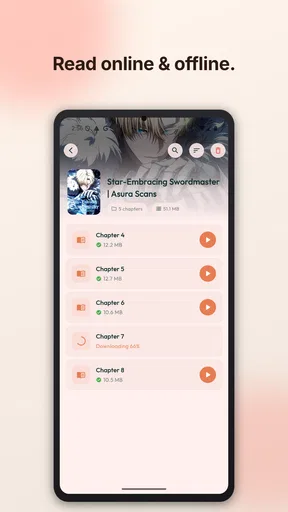
Offline reading depends on the version of the app and the specific title. Some manga and webtoon readers allow chapters to be temporarily downloaded, while others require an active internet connection because content is streamed or protected by licensing restrictions. Look for a download option inside the reader and confirm whether saved chapters expire or use significant storage.
What kind of content and reading features does the app offer?
EZ Manga: Webtoon & Manhwa is intended for serialized comic reading, so users may find features such as genre browsing, search, bookmarks, reading history, chapter navigation, and vertical scrolling. Availability can vary between releases and regions. Check the content ratings and descriptions before reading, since some series may contain mature themes, violence, romance, or other material unsuitable for younger audiences.
Is EZ Manga: Webtoon & Manhwa safe and legal to download?
Download the application only through a trusted official store and verify the developer name, permissions, privacy policy, update history, and user reviews before installing it. For the safest experience, confirm that the comics are properly licensed and that the app does not request unnecessary access to your device. Avoid modified APK files, which can expose your data to malware or unwanted software.
